Sample Accounting Reports
August 15, 2024
all plans
Accounting reports include cash receipts, A/R, deposit, and payment reports, provides the ability to run statements for clients, and more. This article shows examples of each included report to help you decide which to run.
Accessing Accounting Reports
You can access Accounting reports from the menu.
- Click
 Reports.
 - On the Accounting tab, click the desired report.
For additional information, see the Report Overview article.
Available Reports
The following Accounting reports are available in Mango.
- Cash Receipts by Date
- Cash Receipts by Date w/Memo
- Cash Receipts by Group Assignment
- Cash Receipts – Credit Memos Open/Applied
- Cash Receipts Grouped by Type of Payment
- Cash Receipts Unapplied
- Cash Receipts with Invoice Detail by Client
- Cash Receipts with Invoice Detail by Date
- Cash Receipts Write-Offs by Client
- Client A/R Aging Detail
- Client A/R Aging Detail – Billing Groups
- Client A/R Aging Detail with Advance Payments
- Client A/R Aging Summary
- Client A/R Aging Summary Sorted by Client Balance
- Client A/R Aging Summary with Advance Payments
- Client A/R Detail Report for Outstanding Values Due
- Client A/R Summary – Billing Groups
- Client A/R Aging Summary Sorted by Client Balance – Billing Groups
- Client A/R Summary Report for Outstanding Values Due
- Deposit Detail by Bank
- Deposit Summary by Bank
- Payment History by Client
- Payment Monthly Summary by Year
- Statements – Generate Late Fees
- Statements – Print & Email Client Statement Detail
- Statements – Print/Email Client Statements
- Summary by Payment Type
- Work in Progress Details with A/R
Cash Receipts by Date
Cash Receipts sorted by Date with Payment Date, Client Name, Payment Note, and Payment Amount.
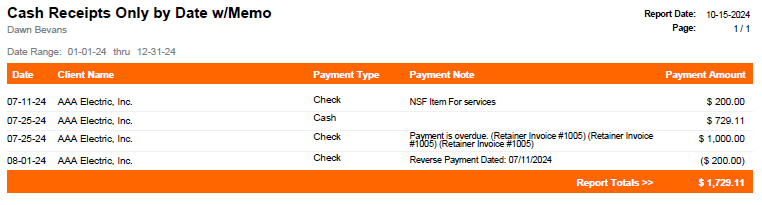
Note: An updated Mango+ version of this report is available. For additional information, see the Cash Receipts Report article.
Cash Receipts by Date w/Memo
Cash Receipts sorted by Date with Payment Date, Client Name, Payment Note, and Payment Amount.
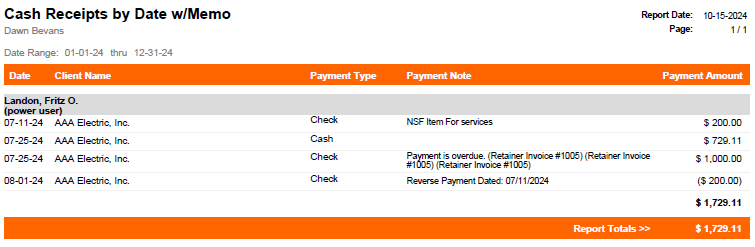
Note: An updated Mango+ version of this report is available. For additional information, see the Cash Receipts Report article.
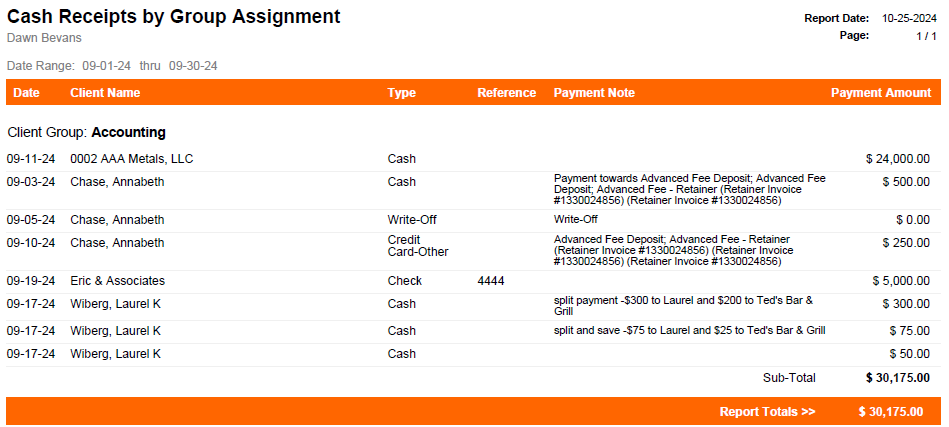
Cash Receipts by Group Assignment
A listing of Cash Receipts grouped by Customer Groups and subtotaled.
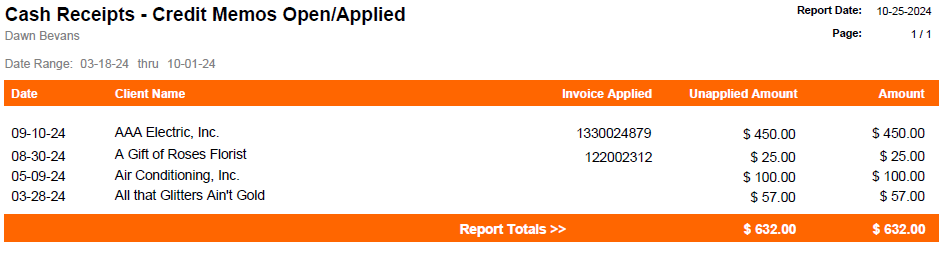
Cash Receipts – Credit Memo Open/Applied
Cash Receipts for Credit Memos applied or unapplied.
Note: An updated Mango+ version of this report is available. For additional information, see the Cash Receipts Report article.
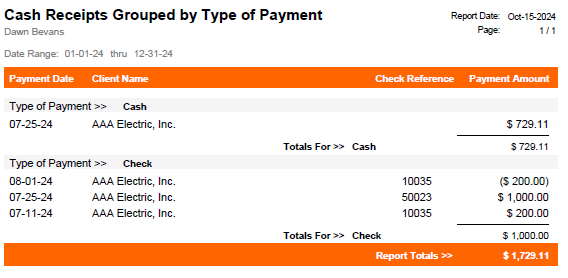
Cash Receipts Grouped by Type of Payment
Cash Receipts grouped by Type of Payment and sorted by date with group and report totals.
Note: An updated Mango+ version of this report is available. For additional information, see the Cash Receipts Report article.
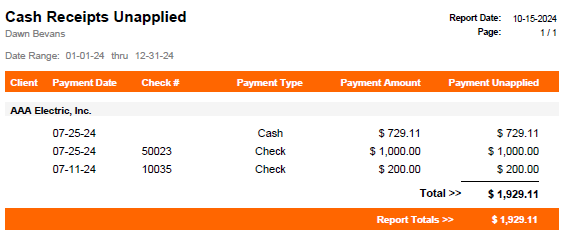
Cash Receipts Unapplied
List of Cash Receipts that have not been applied to invoices or have an unapplied balance.
Note: An updated Mango+ version of this report is available. For additional information, see the Cash Receipts Report article.
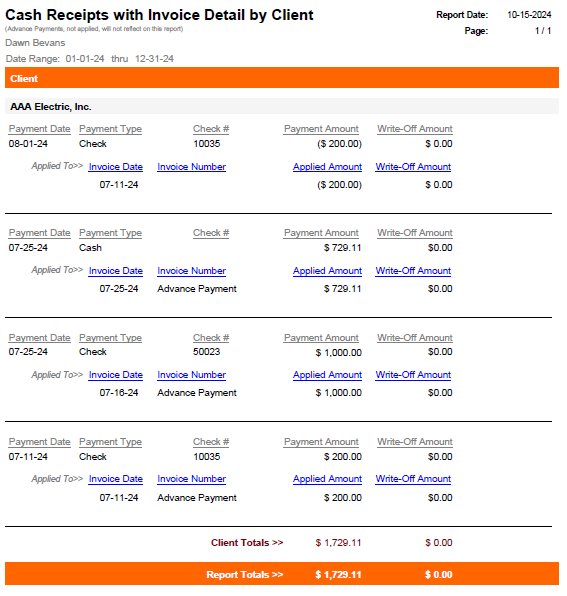
Cash Receipts with Invoice Detail by Client
Cash Receipts listing by Client grouped by payment and payment details applied to invoices.
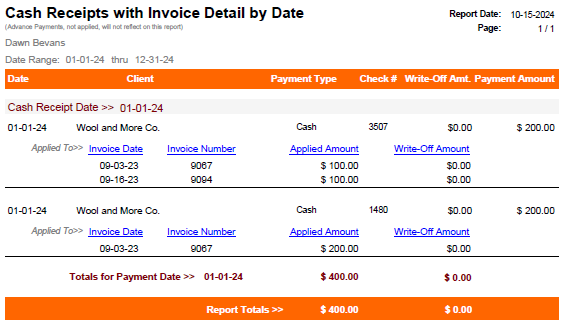
Cash Receipts with Invoice Detail by Date
Cash Receipts by date. Provides information regarding payments on invoices and retainers. Can be filtered by date and subtotaled by day, week, and month.
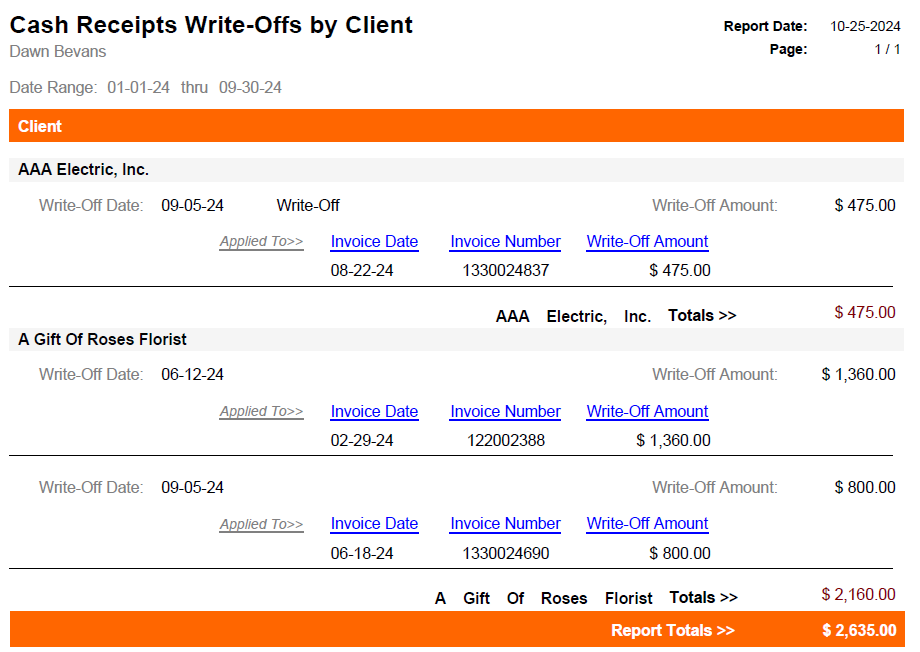
Cash Receipts Write-Offs by Client
List of clients that have write-offs against invoices.
Note: An updated Mango+ version of this report is available. For additional information, see the Cash Receipts Report article.
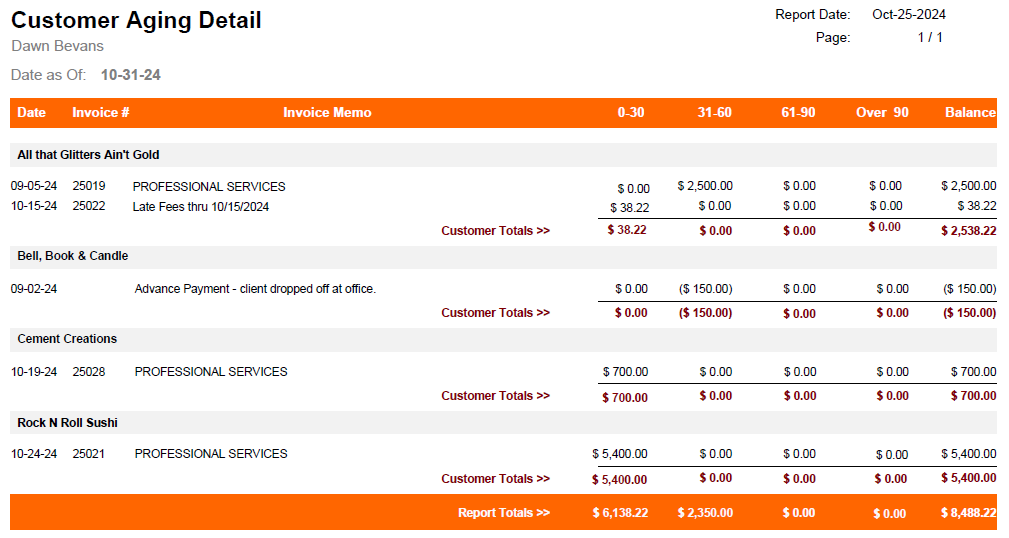
Client A/R Aging Detail
Provides information regarding client balances in a detail format by invoice. Subtotals by client with report totals.
Note: An updated Mango+ version of this report is available. For additional information, see the AR Report article.
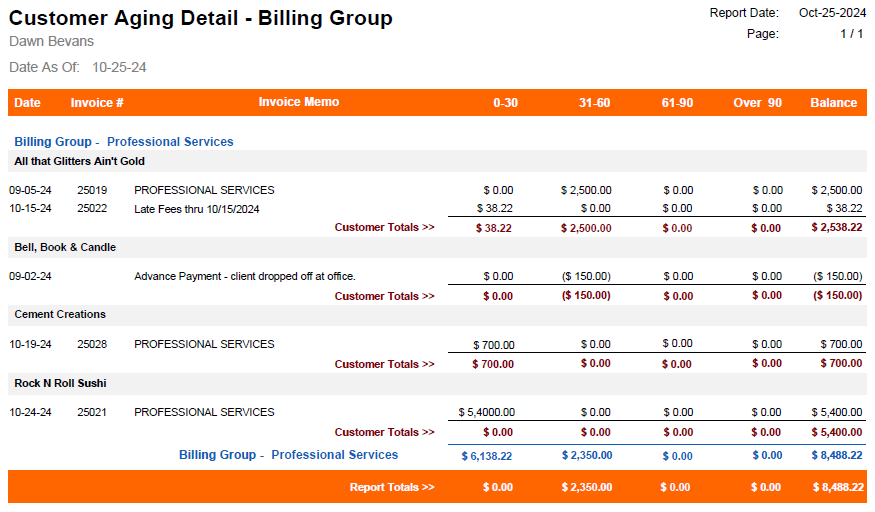
Client A/R Aging Detail – Billing Groups
Provides information regarding client balances in a detail format by invoice. Subtotaled by client with report totals.
Note: An updated Mango+ version of this report is available. For additional information, see the AR Report article.
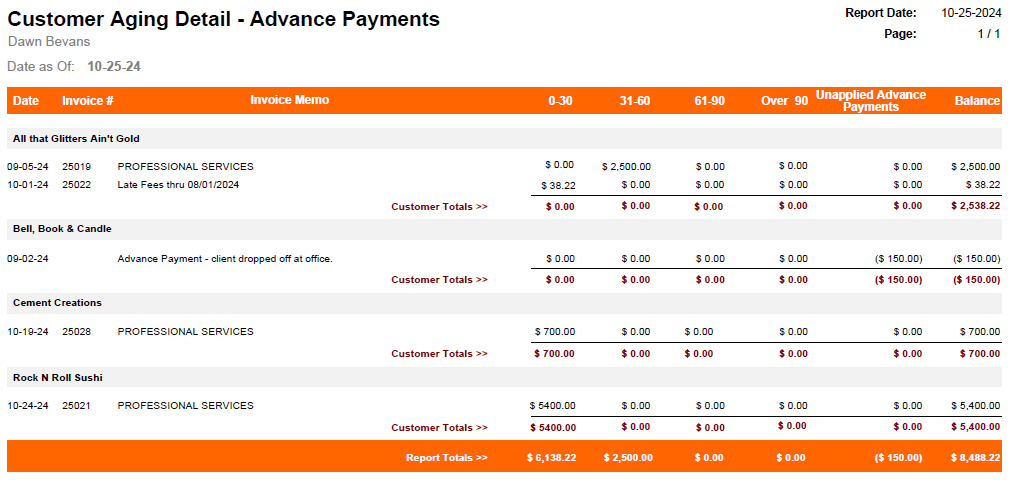
Client A/R Aging Detail with Advance Payments
Provides information regarding client balances in a detail format by invoice. Subtotaled by client with report totals.
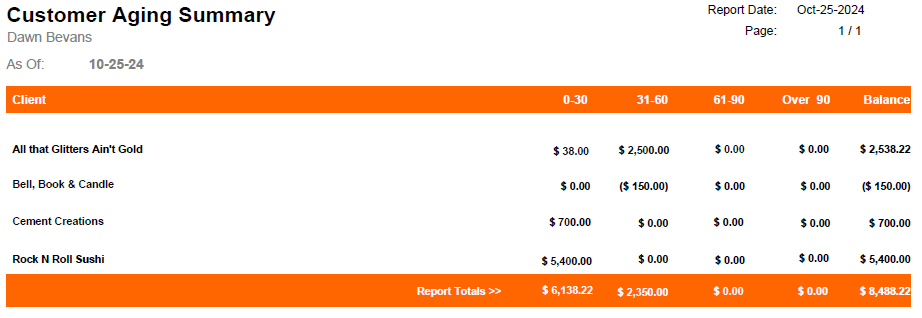
Client A/R Aging Summary
Provides information regarding client balances in a summary format. Subtotal by client with report totals.
Note: An updated Mango+ version of this report is available. For additional information, see the AR Report article.
Client A/R Aging Summary Sorted by Client Balances
Client A/R aging summary sorted by client balances.
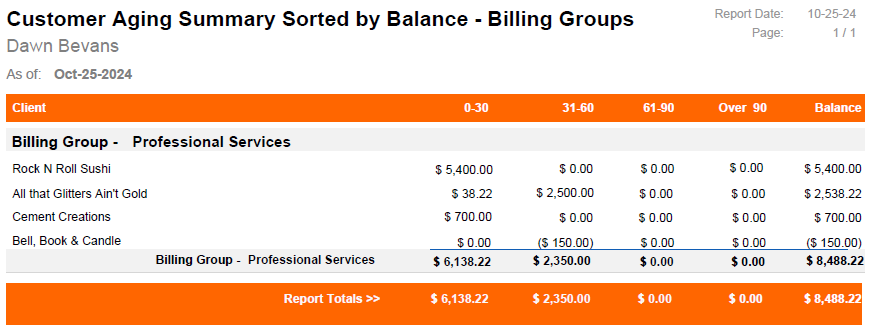
Client A/R Aging Summary Sorted by Client Balance – Billing Groups
Client A/R aging summary grouped by billing groups, sorted by client balances.
Client A/R Aging Summary with Advance Payments
Provides information regarding client balances in a summary format. Subtotaled by client with report totals.
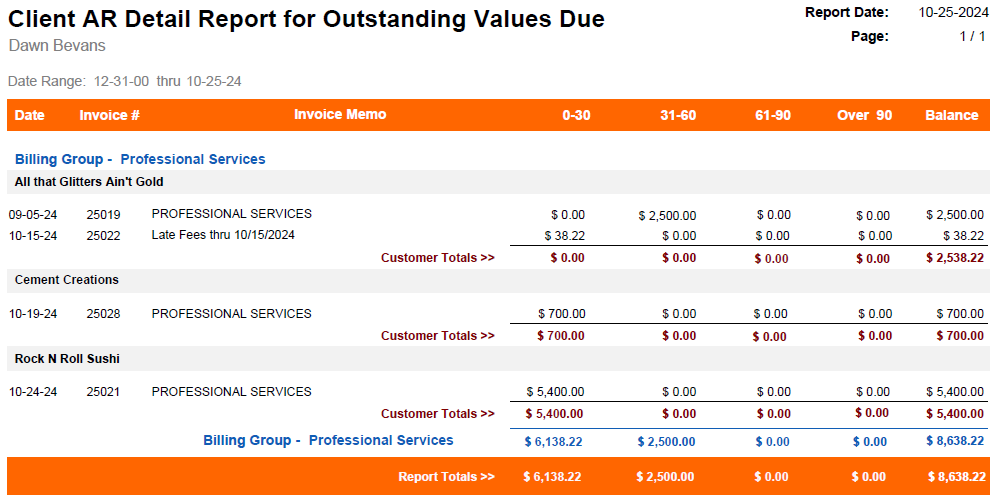
Client A/R Detail Report for Outstanding Values Due
Client A/R aging summary grouped by billing groups.
Note: An updated Mango+ version of this report is available. For additional information, see the AR Report article.
Client A/R Summary – Billing Groups
Client A/R Summary sorted by client and grouped by Billing Group.
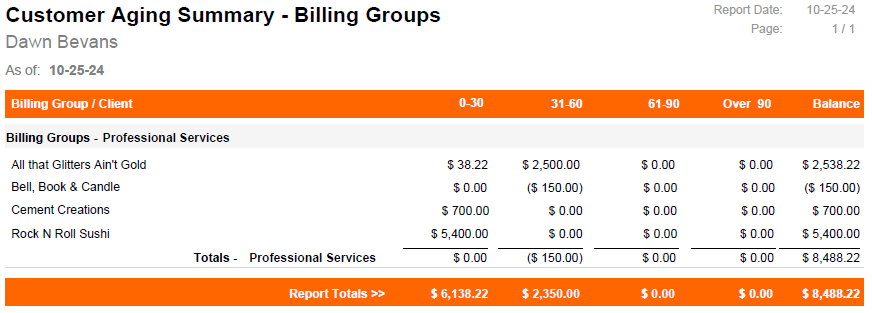
Note: An updated Mango+ version of this report is available. For additional information, see the AR Report article.
Client A/R Summary Report for Outstanding Values Due
Client A/R Summary sorted by client and grouped by Billing Group outstanding values due.
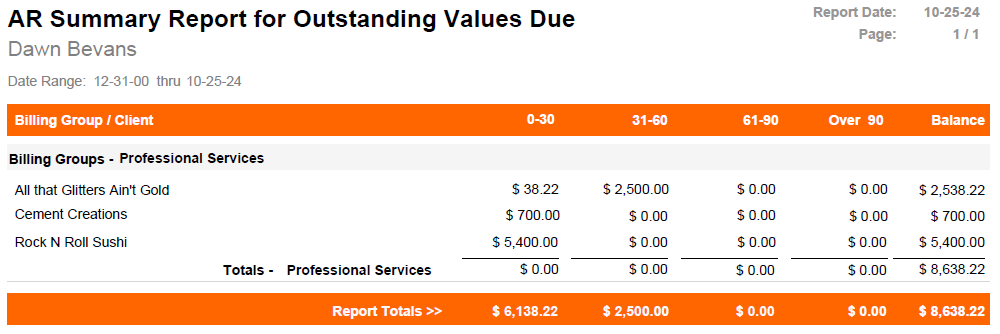
Note: An updated Mango+ version of this report is available. For additional information, see the AR Report article.
Deposit Detail by Bank
Deposit detail by bank and date.
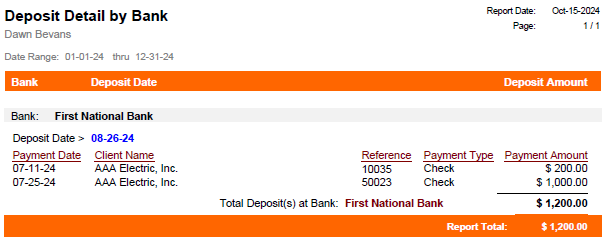
Note: An updated Mango+ version of this report is available. For additional information, see the Bank Deposit Report article.
Deposit Summary by Bank
A list of deposits summarized by date and bank.
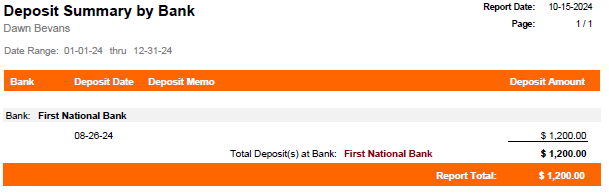
Note: An updated Mango+ version of this report is available. For additional information, see the Bank Deposit Report article.
Payment History by Client
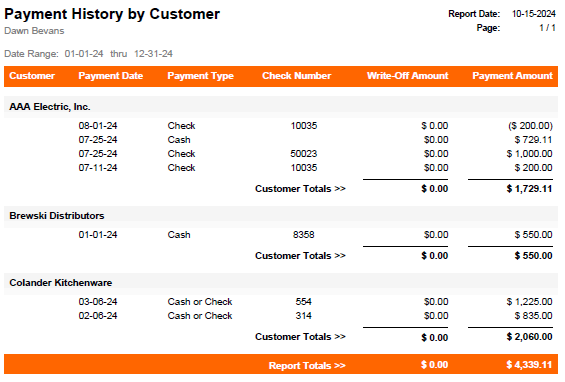
Listing of payments by customer, subtotaled by customer and totals for the report.
Payment Monthly Summary by Year
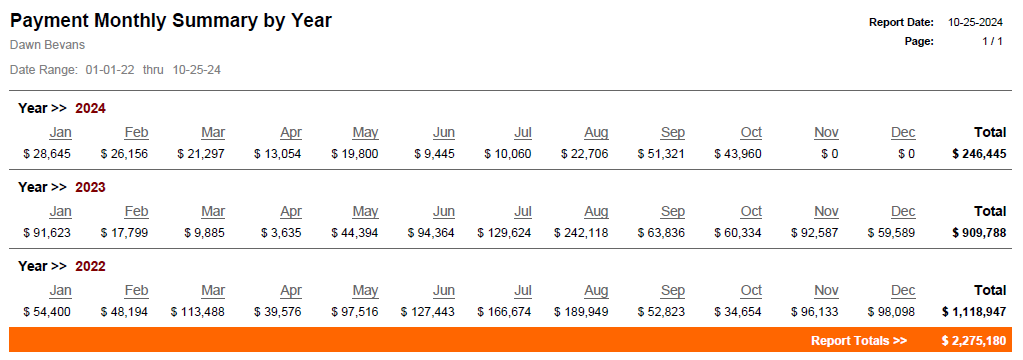
Summary of payments grouped by year and totaled by month.
Statements – Generate Late Fees
Opens the Client Late Fees window where you can process late fees.

Statements – Print & Email Client Statement Detail
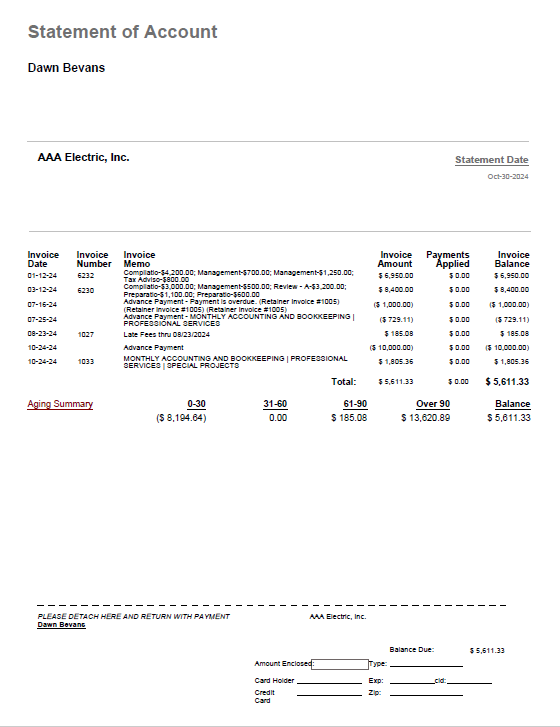
Opens the Statement Printing window where you can filter by Minimum Statement Balance, and Statement Date, allowing you to process detailed statements with an Aging Summary.
Statements – Print/Email Client Statements
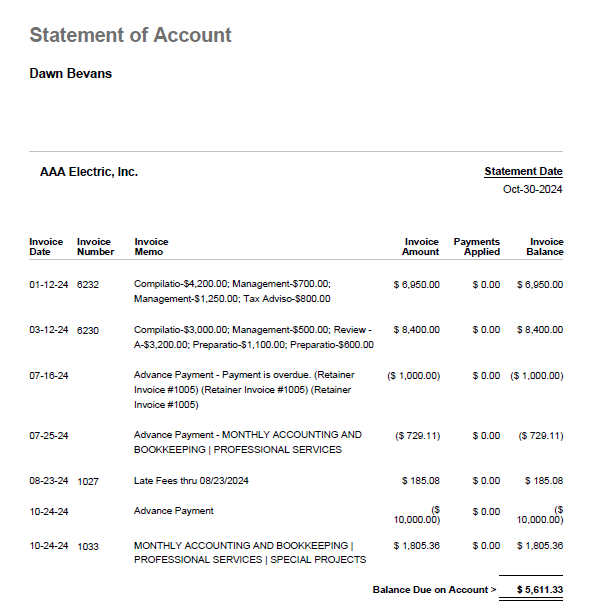
Opens the Statement Printing window where you can filter by Minimum Statement Balance, and Statement Date, allowing you to process summary statements.
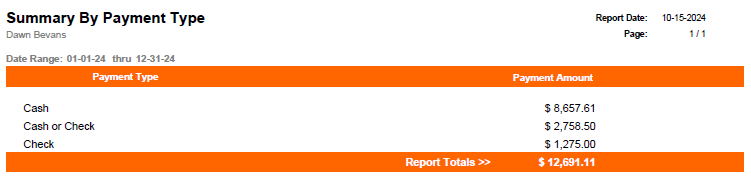
Summary by Payment Type
List of payment types and payment amounts.
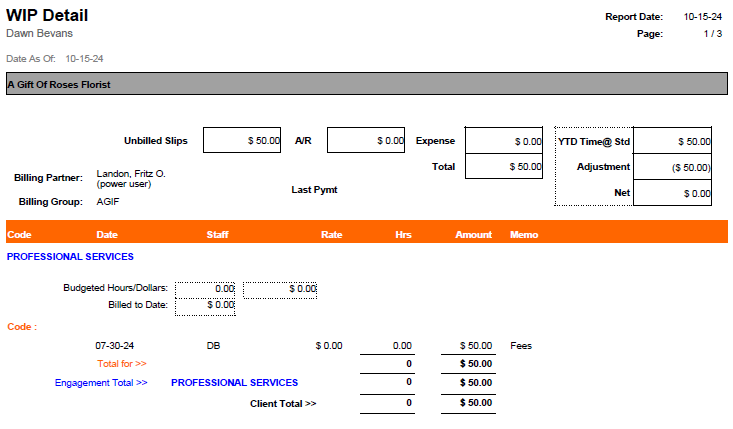
Work in Progress Details with A/R
Work in progress details by Client.